Nikon D3100 DSLR Photography Lesson in St. Petersburg Florida with Kyle

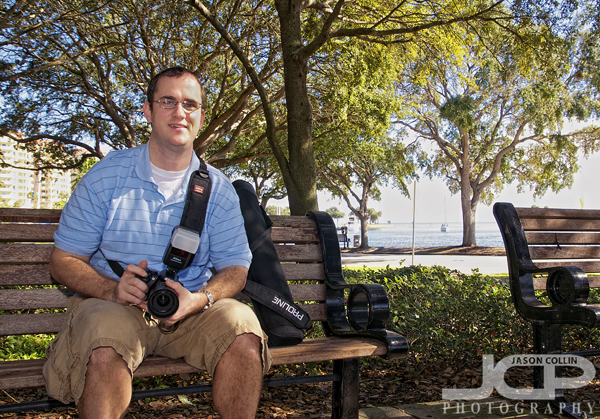
Kyle with his Nikon D3100 in Straub Park with Proline tripod product placementI had been in e-mail contact with Kyle for awhile, giving him tripod buying advice, etc.  This morning I met him for a DSLR Photography Lesson in the usual downtown St. Petersburg spot.  Even though the calendar said December 22nd, it felt more like May 22nd as the Florida sun continued to shine on full force.  

As usual during a first lesson, we covered a wide range of photography topics starting out with my 4-step process for getting the settings right for any given type of shot followed by simply how to best hold a DSLR for maximum stability and efficiency.  Kyle kept his Nikkor AF-S 35mm f/1.8G lens on his D3100 as we went from making shots with bokeh, to controling DoF for group shots, to how to compose and take shots using a tripod, before ending with some flash portrait practice.  

I hope Kyle can put all we covered today to use to produce his best holiday photographs ever.  He already had two of his photographs published in a local credit union's calendar, maybe next year he can go national!

Tampa Model Urban Portfolio Shoot with Stephanie

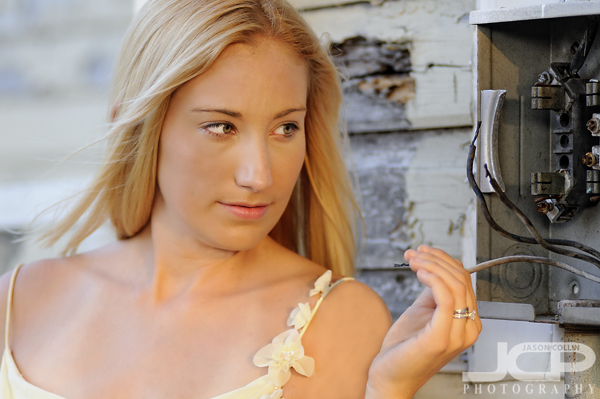
Pay phones may not be around much longer, I will be sad to see them go -- Nikon D300 Nikkor 80-200mm @ f/5.6 ISO 200 1/60th Strobist: SB-600 to frame left

During this portfolio shoot with model Stephanie in and around downtown Tampa a telephone theme began to just naturally get created.  I did not think about it at the time, but upon editing the above photo I realized that pay phones will not be around much longer.  Probably anyone under age twenty today has never nor will ever use one.  I find it very interesting the things that become obsolete in a society.

Similarly, phonebooks will become relics -- Nikon D300 Nikkor 80-200mm @ f/5.6 ISO 200 1/80th Strobist: SB-600 to frame leftIt seems only natural that if pay phones disappear, so too will phonebooks.  I cannot say that the last few phonebooks did anything but immediately go into the hallway closet and then eventually the recycling bin.  We found this old, decaying phonebook near an equally old and decaying house.  It was my idea to add the cellphone to the shot to contrast with the phonebook.

Analog technology in ruin -- Nikon D300 Nikkor 80-200mm @ f/2.8 ISO 400 1/400th Strobist: SB-600 to frame rightI really enjoyed making these nontraditional modeling shots with Stephanie and I appreciate her being open to so many unusual ideas.  She interacted with all the urban props we found in juxtaposition to how she was dressed, in flowing summer dress.

How to fix black clouds in HDR images using layer mask

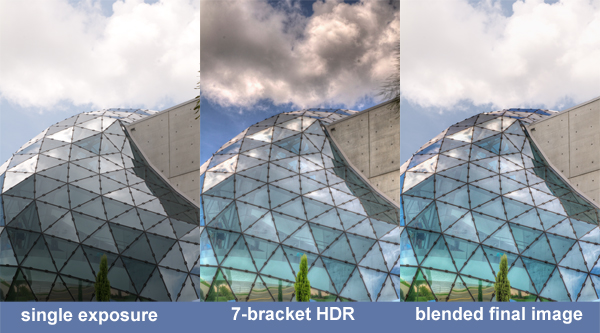
HDR photography and images are very popular right now.  I, myself, have participated in a local exhibition featuring only HDR images.  The thing is, I do not care for 90% of HDR photography I see.  There is a large debate about processing HDR images to look more real or more hyper real.  I am not referencing that debate here.  For me, a simple reason why I do not find a vast majority of HDR images appealing is because they suffer from horrible shadow effects as demonstrated in the black clouds in the center image above.  As you can see with the single exposure photo, the sky looks good, but there is no detail inside the glass.  The 7-bracket HDR image reveals what is under the glass and adds better color, but at the expense of the clouds.  Therefore, the best final results come from blending the single exposure photo with the 7-bracket HDR image.
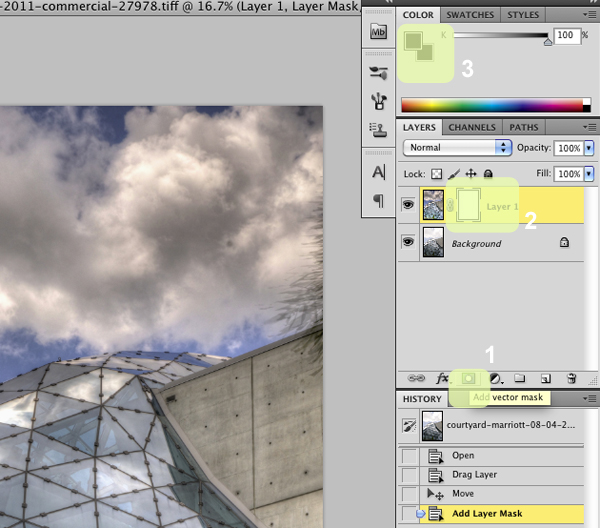
1. click on add layer mask (sorry, shows vector) 2. click on layer 1 3. paint with a black brushBlending two images together is not a difficult time consuming process using Photoshop.  The screenshots in this post are using CS5, but other versions should basically be the same.

First, open the single exposure photo and 7-bracket HDR image in Photoshop.  Drag the 7-bracket HDR image on top of the single exposure photo.  Once you do this you will only see the 7-bracket HDR image.  The single exposure photo is completely hidden underneath.  Our goal is to reveal only the parts of the single exposure photo we want, in this case, the clouds and sky.

After you have dragged the 7-bracket HDR image on top of the single exposure photo, follow the three steps highlighted in the screenshot above: 

  1. Click on "Add layer mask"
  2. Click on "Layer 1"
  3. Select the Brush tool: soft brush setting, black, 60% opacity (or similar, just not 100%) 
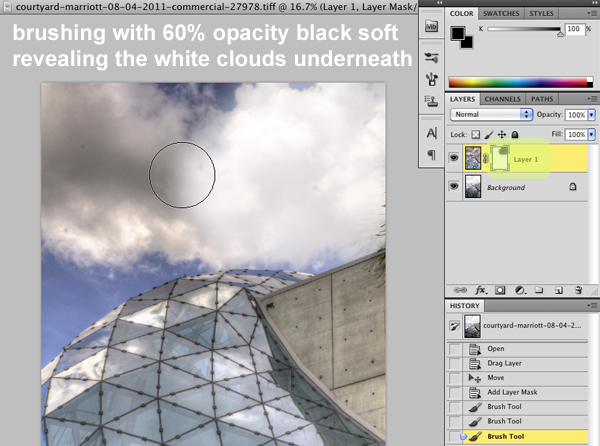
Now using the Brush tool at the settings described above, slowly brush the areas you want to reveal.  The 7-bracket HDR image starts to disappear revealing the single exposure photo below.  In the above screenshot you can see that I already revealed the nice white clouds on the right side.  Here is an extra tip:  I also used the Brush tool on the concrete wall of the building that looked too black & dirty to reveal the cleaner wall from the single exposure photo.  If you make a mistake and reveal something you did not want to, set the Brush color to white and the top image will return.
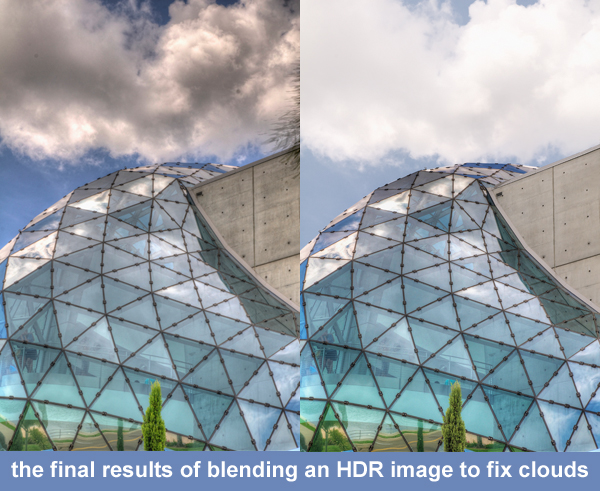
Here again are the before and after results.  By using a layer mask you can create a dynamic hdr image and still maintain the clean look of clouds, walls, etc in the image.  This vector mask technique is great for other photography tricks too.  Want to change the background on a portrait?  You can do that following this same process! (see results here)

Try the vector mask process on some of your images and be sure to post links to the results in the comments below. 

  • Read more photography tips
  • Reserve your own 1-on-1 DSLR Photography Lesson with Jason today!
  • Learn more about the lessons
  • Christmas Lights Santa Plays Baseball in St. Petersburg Florida

    Santa an an elf (?) playing baseball before Christmas!If you were wondering what Santa was up to two weeks before his lone out of home work day, it seems he was out playing baseball here in St. Petersburg.  I thought this was a pretty funny subject matter to have Christmas lights for so I was glad I had my DSLR with me.  Such photographs can be made handheld no problem as one only needs to expose for the lights of the subject.  Having the background remain all black is a plus for a lights shot.  

    What are the funniest, most unusual Christmas or holiday lights in your town? 

  • Read more photo stories
  • Reserve your own 1-on-1 DSLR Photography Lesson with Jason today!
  • Learn more about the lessons
  • Flamenco Dancer at Ceviche St. Petersburg Florida Commercial Photography

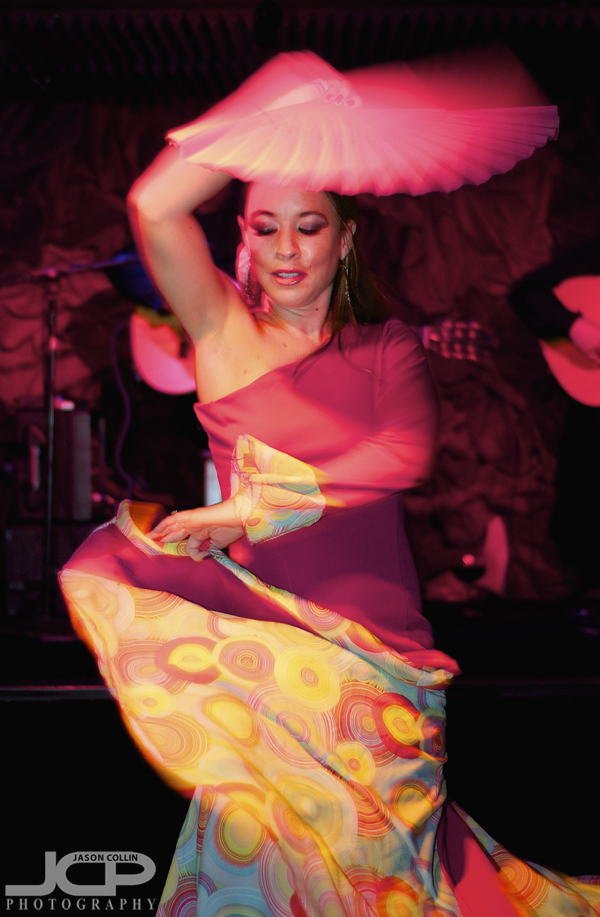
    Flamenco Dancer Vanessa at Ceviche St. Petersburg - Nikon D300 Nikkor 50mm @ f/2 ISO 800 1/40th SB-800 @ 1/8th power hotshoe mountedI first had the opportunity to photograph professional flamenco dancer Vanessa two years ago.  We had been in touch a few times since then about me photograhing her dancing again.  Well, last week finally everything worked out so that I could photograph her while performing at Ceviche in St. Petersburg.  Vanessa told me beforehand that the basement flamenco bar of Ceviche is very, very dark.  I spoke with a photography colleague who has shot there and he confirmed that adding also that the ceiling is very low.  The biggest challenge proved to be the red stage lights, followed by the very tight space available for shooting (serving staff & customers passing by).

    The flamenco bar stage at Ceviche St. Petersburg - Nikon D300 Tamron 17-50mm @ f/2.8 ISO 800 1/60th SB-800 @ 1/8th power hotshoe mountedThe small space, though, provided for a very lively environment with the band playing quickly and loudly, and the four flamenco dancers taking their turns on the low stage.  Vanessa has her turn while the other dancers looked on.  

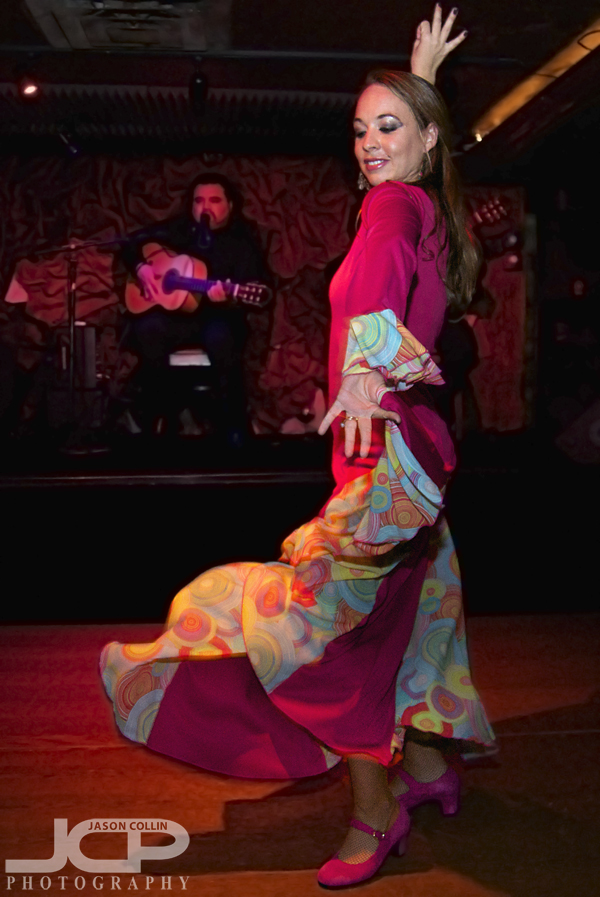
    I could have used my speedlights to fill the entire space with light, resulting in radically different photos than you see here.  However, Vanessa wanted the images to reflect the actual available light in the performance space as much as possible, which I agreed with.  Since most of the lighting in the basement was reddish and yellowish, those are the tones of the images along with deep shadows in the background.

    Vanessa's finale dance at Ceviche St. Petersburg - Nikon D300 Nikkor 50mm @ f/2 ISO 800 1/40th SB-800 @ 1/8th power hotshoe mountedIt was a very fun challenge photographing Vanessa in Ceviche's flamenco bar basement.  Maybe next time I will return just as a customer!

    Off Camera Flash Strobist Beach Portrait Photography Lesson Florida

    Jasmina practicing off camera flash with a single strobe on Sunset Beach, Treasure Island, FloridaIt was bright and sunny an hour before my lesson with new DSLR Photography Lesson student, Jasmina.  She called me to see if the lesson was still on because it was raining where she was to the south.  I said it's all sunshine here and it was so right up to the start of our lesson.  Then the clouds began rolling in, but no rain at all so it was just a bit chilly on the beach as I began showing Jasmina my off camera flash and strobist techniques for making beach portraits.

    She brought a willing model with her which was great news for me because this meant I did not have to be both model and teacher!  Actually, I did have one role in addition to teacaher, and that was human light stand.  We used Jasmina's Nikon SB-900 Speedlight for single strobe technique at first, but added one of my own strobes to show the benefit having two lights sources has.  

    It was a fun and intereting lesson for me as I do not often get to teach strobist stuff, which is one of my favorite types of photography.  I look forward to seeing Jasmina's future off camera flash portraits on the beach and off.

    Help-Portrait 2011 St. Petersburg Florida behind the scenes

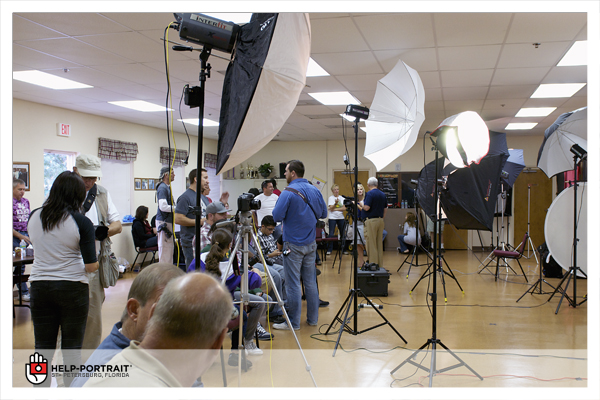
    Jam packed with photographers and gear getting ready to start Help-Portrait 2011 in St. Petersburg, FloridaToday was the third annual Help-Portrait global movement for providing free printed portraits as a way of giving back to those in need.  It was my first time to participate.  I did not know what to expect exactly as I was having a hard time imagining what it would look like with so many mini-studio setups in one place.  I was surprised to walk into the room and see the above scene . . . so much gear!

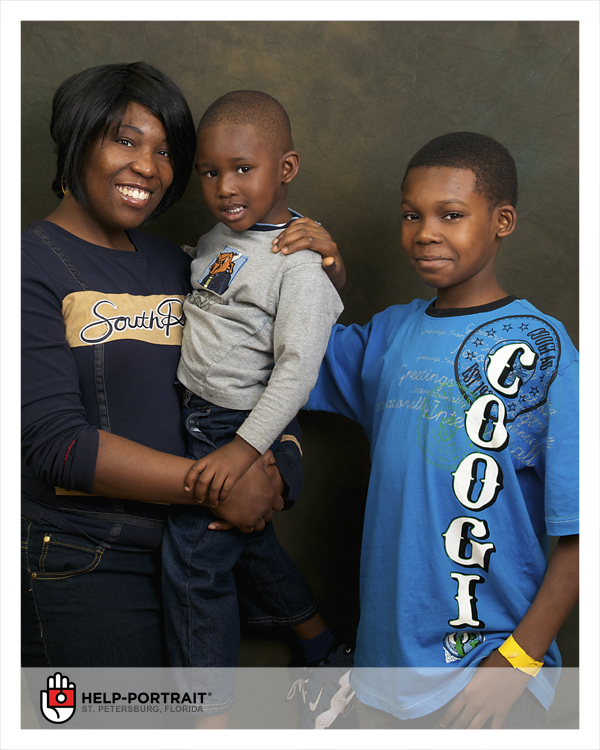
    What Help-Portrait is all about - Nikon D300 Nikkor AF-S 24-70mm @ f/5.6 ISO 200 1/60th Strobist: SB-800 @ 1/4 power & SB-600 @ 1/8 power behind shoot through umbrellasThis was the first family I had the opportunity to photograph this morning.  I always like to, when possible, have the family members be in contact with each other somehow, which is why I asked the boy on the right to put his hand on his little brother's shoulder.

    Having fun having their portrait made at Help-Portrait 2011 St. Petersburg FloridaThe atmosphere in the room was great and there were big smiles all around.  It is really fun to make photographs in such an environment.  It was also a chance for me to see other photographer's portrait setups and learn a few things myself.

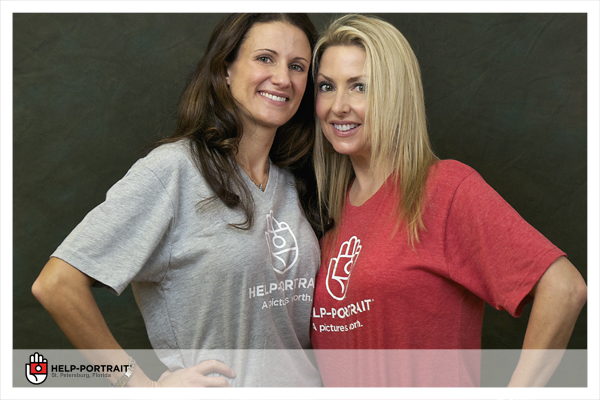
    Help-Portrait photographer volunteers wearing t-shirts with the Help-Portrait logoWhen there was some time between photographing families we made portraits of ourselves with the other volunteers we met this day.  If you have a lighting setup and people standing around, photographs will get made!

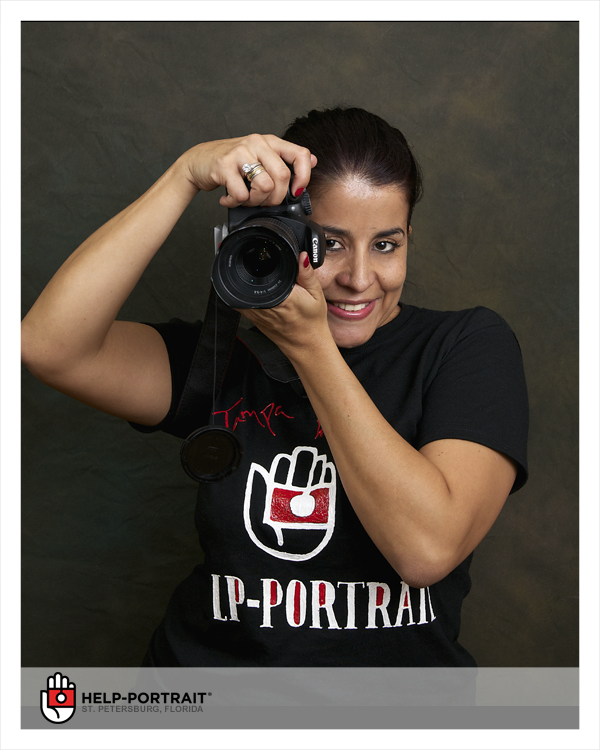
    One of the photographers from Help-Portrait with her own custom made Help-Portrait t-shirt!I really enjoyed being involved with Help-Portrait and hope to be able to do so again next year.  For more information about Help-Portrait please visit their official website.